The usual advice, and what is wrong with it
Search for this and you will find the same list from a dozen inventory tools: SKUs not matching exactly, two systems both writing stock counts, a webhook that has stopped, bundles and multi-location logic misconfigured, tracking not enabled on the variant.
The list is correct. Every one of those causes is real and I have seen all of them. The problem is the method that comes with it, which is always some version of audit which apps have inventory write permissions.
That is a list of suspects, not evidence. It tells you which apps could have written the number. On a store with a connector, a 3PL app, a POS and a bulk editor, everything could have written the number, and you are now reading permission scopes and guessing.
Shopify already recorded it
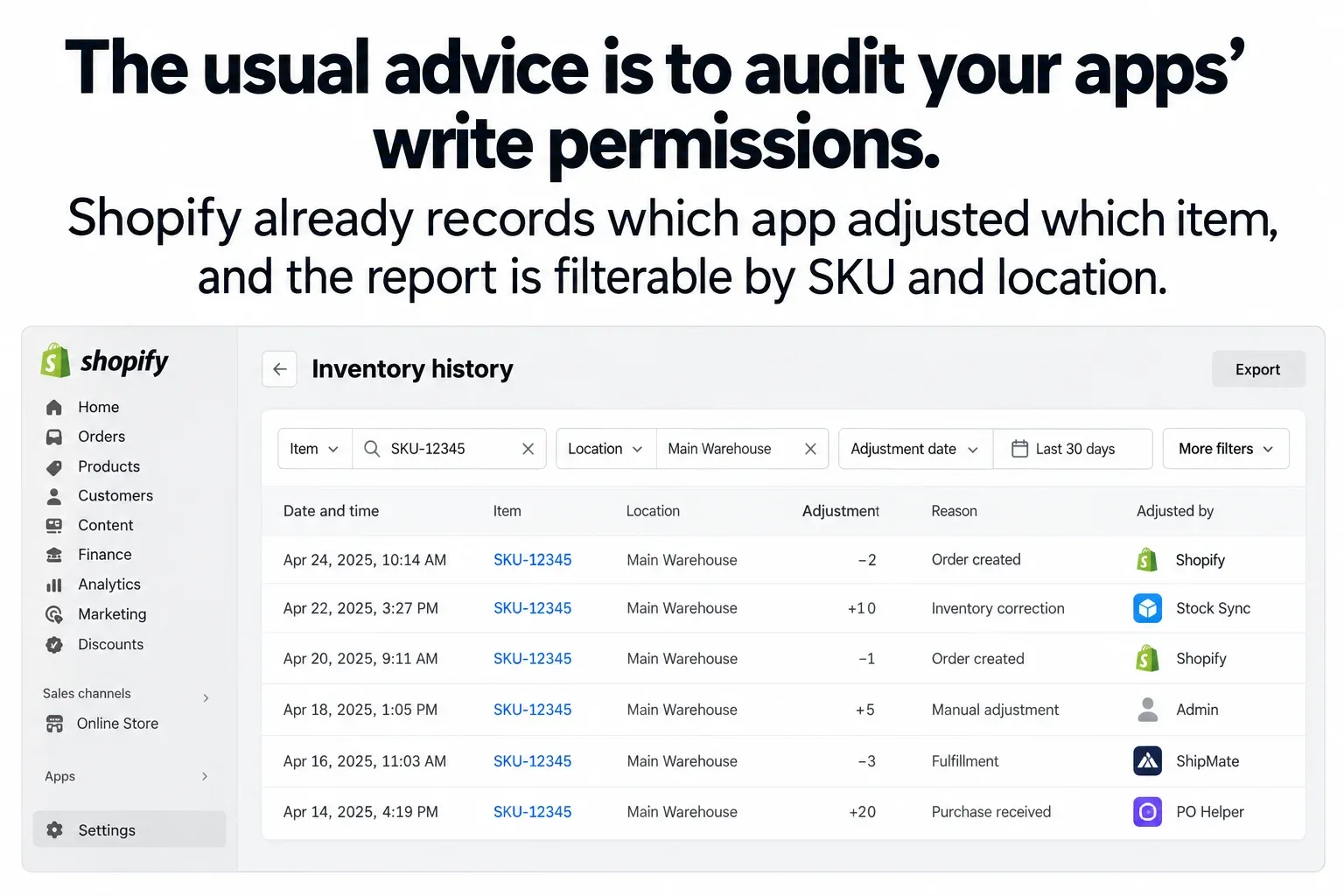
Every inventory change in Shopify belongs to an InventoryAdjustmentGroup, and that group records which app or staff member initiated it, when, and why. It is not a derived thing you have to reconstruct — it is written at the time of the change, for every change.
In the admin it surfaces as the inventory adjustment changes report, filterable by SKU, location, staff member, app and reason. Filter to the SKU that is wrong, over the window in which it went wrong, and the question stops being which app could have done this and becomes here is what each app actually did, in order.
Most of the time the answer is visible in the first screen. Two apps appear against the same item. One is your ERP connector writing the correct figure; the other is something installed eighteen months ago for a channel you no longer sell on, still dutifully writing its own idea of stock every few hours.
Filter by location as well as by SKU. Inventory is held per location, and a figure that is correct at the warehouse and wrong at the retail store is a different fault from one that is wrong everywhere — but a report filtered to the SKU alone shows both as a single confusing sequence. Multi-location stores routinely end up with one integration writing every location and another writing only one, and the interleaving makes no sense until you separate them.
Whether the number the connector is writing was right in the first place is a separate problem with its own failure modes — this is about finding out who wrote the one you are looking at.
The field that looks like an audit trail
There is a trap in the write path worth knowing before you build anything that adjusts stock.
Two fields carry an audit reference. referenceDocumentUri records the system and document that initiated an adjustment, and it is the one that appears in the admin — in the adjustment changes report and on the Adjustment History page. ledgerDocumentUri is also an audit reference, is required when you adjust any quantity other than available, and does not appear in the history UI at all.
So it is entirely possible to write a scrupulous audit reference on every adjustment your integration makes, satisfy the API, and leave the person diagnosing this in six months looking at a blank column. If you want your own writes to be identifiable by a human in the admin, they go in referenceDocumentUri. The other one is mandatory and invisible.
While you are in the write path, the choice of mutation matters for exactly this failure. inventoryAdjustQuantities takes a delta, so it composes with whatever else happened in the meantime. inventorySetQuantities takes an absolute, so it does not — it overwrites the current value whatever that value became. Two integrations both setting absolutes will overwrite each other by design, on schedule, with no error anywhere, and the ledger will show them doing it perfectly cleanly.
While you are there: committed is derived and cannot be written through the Admin API, so committed looks wrong is never something an integration did.
Reading the ledger
Once you have the changes, the analysis is small enough to be worth doing properly rather than eyeballing a report.
/** A change Shopify could not attribute is not "nobody" — it is a gap in the trail. */
const UNATTRIBUTED = "(unattributed)";

export function writersFor(changes) {
  if (!Array.isArray(changes)) throw new Error("changes must be an array");

  const byWriter = new Map();

  for (const c of changes) {
    if (!Number.isInteger(c.delta)) throw new Error(`delta must be an integer, got ${c.delta}`);

    // An adjustment is attributed to an app or a staff member, never both.
    const who = c.app ?? c.staffMember ?? UNATTRIBUTED;
    const entry = byWriter.get(who) ?? { writer: who, adjustments: 0, net: 0, reasons: new Set() };

    entry.adjustments += 1;
    entry.net += c.delta;
    if (c.reason) entry.reasons.add(c.reason);
    byWriter.set(who, entry);
  }

  const writers = [...byWriter.values()]
    .map((e) => ({ ...e, reasons: [...e.reasons].sort() }))
    // Most active first: the noisiest writer is the one worth looking at.
    .sort((a, b) => b.adjustments - a.adjustments || a.writer.localeCompare(b.writer));

  return {
    writers,
    // Shopify's own order flow always writes. More than one writer *besides*
    // that is the contention worth escalating, not two writers in total.
    contended: writers.filter((w) => w.writer !== UNATTRIBUTED).length > 1,
  };
}Why count rather than sum
The reason to count per writer rather than sum is the case that fools people: two integrations correcting each other net to zero. The total looks untouched, the item never surfaces in anything sorted by magnitude, and the stock is wrong for the whole interval between the two writes.
What the ledger will not tell you
It will not tell you which number was right. It tells you who wrote what and when; deciding which system should own the figure is an architectural question the audit trail has no opinion about.
It will not catch a write that never happened. A webhook that stopped firing leaves no adjustment, so the symptom is an absence — the item simply stops appearing after a date. That is findable, but you are looking for a gap rather than a conflict, and the report will not point at it.
It does not cover everything that moves a number. Orders, returns and fulfilments change available and committed through Shopify's own flow, so a busy item's history is mostly Shopify writing to itself, and the integration's writes have to be picked out of that.
And it is retrospective. It is very good at telling you what went wrong last Tuesday and no help at all at stopping it happening again, which is a different piece of work.
When this needs an engineer
Often it does not. If two apps are writing the same items, uninstalling one is the entire fix and you have just done it yourself with a report and ten minutes. If tracking is off on a variant, that is a checkbox. A great deal of what gets escalated as an integration problem is a configuration problem that the adjustment history makes obvious.
It needs engineering when the correct number is not a copy of anything — when what Shopify should display is the output of a decision rather than a figure sitting in another system. That was the case twice for one wholesale business. Its reservation logic subtracts warehouse-picking orders from Exact stock before working out what is genuinely available to anyone else, and its pre-order automation drives availability, caps, badges and pre-order state from the same source. In both cases the figure a customer sees was decided rather than copied, which means a discrepancy has an author and an intent behind it — and neither could be a connector setting, because no setting expresses either rule. Both sit with the other Exact Online integrations we built for them, and both are Shopify ERP and CRM integration work.
Send us the store and the symptom.