What Shopify runs, and what it doesn’t
Shopify runs the store, the checkout and the admin. It does not run your app. A custom app is a web service somebody else has to host: it needs a public HTTPS address, its credentials in environment variables, a database, and a process that stays up. When the address changes, Shopify has to be told.
The defaults are worth knowing because they are built for getting started, not for production. Shopify’s app template stores sessions in SQLite through Prisma, and its own deployment guide notes that you can only run more than one web container if the database gets its own container or volume. The same guide warns that one popular host may suspend idle containers and reset disk storage — which is fine for a demo and a quiet catastrophe for a database that lives on that disk. Managed hosting is not automatically the safer choice; it moves the failure somewhere you are less likely to look.
The address is part of the contract, too. Shopify’s deployment guide is explicit that when the app’s URL changes, the configuration has to be updated and redeployed with shopify app deploy. Moving a self-hosted app to a new server is therefore not only a server migration. Until Shopify is told, the admin is embedding the old address and every webhook is going to it.
Why a client’s own server
The Säsongsgruppen platform runs on a client-controlled VPS, with backup and operational services alongside it, on Remix and Node.js with PostgreSQL behind Prisma rather than the template’s SQLite.
Our position is that this is the right shape when the app holds records the business would be unable to reconstruct elsewhere. That platform holds an append-only payout ledger — money owed to clubs, teams and sellers — and records of that kind should sit on infrastructure the business owns, with backups the business can restore without asking a vendor. A self-hosted server is also cheap at this scale and does not change price when a platform reprices.
The cost is plain and should be said out loud at the start: the client now owns uptime. Nobody at Shopify will notice the app is down. Nobody at a hosting company will restart it. If the process stops, it stays stopped until a human or a monitor notices.
Webhooks are the fast path, not the record
That matters more than it seems, because of how Shopify delivers events.
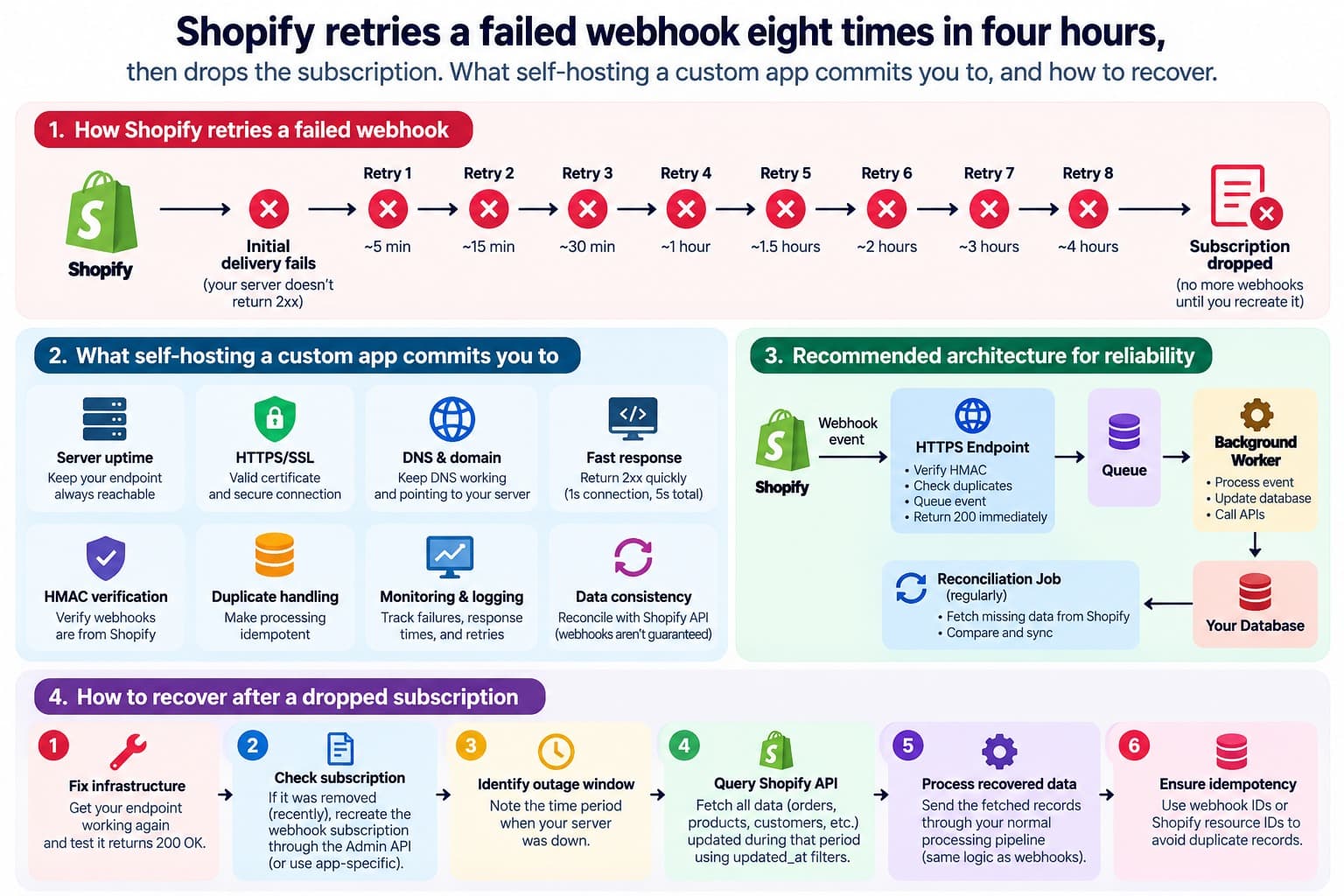
An app has five seconds to respond to a webhook. If it does not, Shopify retries — up to eight times over four hours — and if failures persist, the subscription is removed. Shopify’s own guidance for recovering is to re-subscribe and import the missing data. Separately, a webhook can arrive more than once after a timeout or a retry, so an app that counts deliveries rather than events will double-count.
The two rules interact in a way that catches self-hosted apps in particular. A small server under load, writing to its ledger before it answers, can take longer than five seconds. Shopify counts that as a failure and sends the webhook again — so the app records the same order twice, not because anything was wrong with the delivery, but because it was slow to say thank you. The fix is ordering rather than speed: acknowledge first, do the work afterwards, and make the work safe to repeat.
Read together, those rules say something simple: webhooks are a notification that something happened, not a guarantee you will hear about everything. An app whose records are built only from webhooks is complete exactly as long as it has never been down, and every self-hosted app is eventually down.
/** An order as fetched from the Admin API, with the seller attribute it was placed with. */
type ShopifyOrder = { id: string; createdAt: string; sellerRef: string | null };

/** What the app recorded when a webhook arrived. */
type Recorded = { orderId: string; webhookId: string };

type Finding =
  | { kind: "missed"; orderId: string; sellerRef: string }
  | { kind: "unattributed"; orderId: string };

/**
 * Compare what Shopify says happened in a window with what the app heard about.
 *
 * Webhooks are the fast path, not the record. The attribute rides on the order
 * itself, so anything the app missed while it was down can be recovered from
 * the order, as long as something goes looking.
 */
export function reconcile(fetched: readonly ShopifyOrder[], recorded: readonly Recorded[]): Finding[] {
  // Retries and duplicate deliveries mean one order can be recorded several
  // times; what matters is whether it was recorded at all.
  const seen = new Set(recorded.map((r) => r.orderId));

  const findings: Finding[] = [];
  for (const order of [...fetched].sort((a, b) => a.createdAt.localeCompare(b.createdAt))) {
    if (seen.has(order.id)) continue;
    const ref = order.sellerRef?.trim();
    findings.push(ref ? { kind: "missed", orderId: order.id, sellerRef: ref } : { kind: "unattributed", orderId: order.id });
  }
  return findings;
}Reconcile on a schedule
So the app does not trust its own memory. On a schedule — daily is enough for most — it fetches the orders Shopify has for a window, compares them with the orders it recorded, and processes the gaps. A missed order is not lost, because the seller attribution rides on the order itself; the app simply has to go and read it.
Make the windows overlap. A daily job that looks back exactly twenty-four hours has a seam at midnight, and an order placed while the previous run was still working can fall into it. Looking back forty-eight hours every day costs almost nothing, because the comparison is safe to repeat: an order already recorded is simply skipped, however many times the job sees it. Overlap is only cheap when the processing is idempotent, which is one more reason to build it that way.
The same job is the cheapest monitor you will ever write. A reconciliation that finds gaps every day is telling you the webhooks are failing, long before a seller asks why their total looks low. And it should check the subscriptions themselves exist, because after a long enough outage they may not.
What self-hosting does not cover
It does not cover the server. Patching, firewalls, TLS renewal and restore drills are the client’s now, and a backup nobody has ever restored is a hope rather than a backup.
It does not exempt you from data obligations. Shopify makes its privacy compliance webhooks mandatory for apps distributed through the App Store, with thirty days to act on a request. A custom app installed on one store is not named there, but the personal data it holds is still personal data, and the obligation to handle it properly does not depend on whether a webhook is mandatory.
And it does not make reconciliation optional on any host. A managed platform reduces how often the app is down. It does not make it never down.
When this needs an engineer
It does not, if an App Store app does the job. Someone else hosts it, monitors it and answers for it, and for most needs that is a better deal than any server you could run.
It needs one when the app holds the business’s own records — money, attribution, anything that cannot be rebuilt from Shopify alone — and when the business wants to own where those records live. Then hosting, backups, monitoring and reconciliation are part of the build, not chores after it. That work sits with our other custom Shopify applications, and it is what custom Shopify app development should include from the first day rather than the first outage.
Send us the store and the symptom.
---