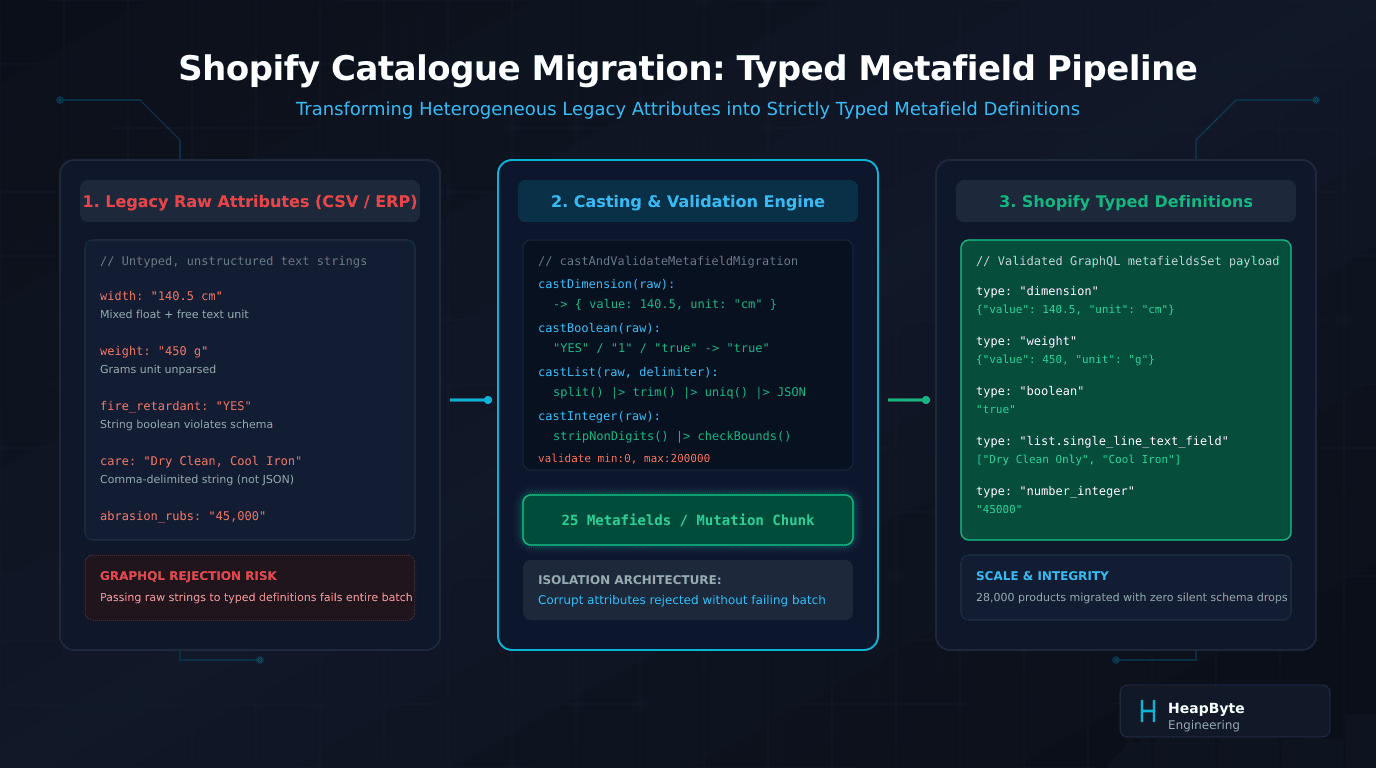
The death of untyped string metafields
Historically, Shopify metafields operated without definitions. Any private app or script could write to any arbitrary namespace and key using value_type: 'string' or 'integer'. The platform treated the value as opaque text.
This legacy flexibility was disastrous for store performance and data integrity. Because the platform had no schema contract, storefront themes could not reliably format numbers, faceted search apps could not build numeric range filters (such as filtering fabrics between 130cm and 150cm width), and administrators frequently overwrote structured data with malformed strings.
Modern Shopify replaces this free-for-all with Metafield Definitions. When a definition is established—for instance, specifications.bolt_width with type dimension—the platform acts as a strict schema validator. Any GraphQL mutation or CSV import that attempts to set a value on that namespace and key must satisfy the definition's type and validation rules.
If your migration pipeline passes '140.5 cm' as raw text to a dimension definition, the Admin API does not attempt to guess your intent. It throws a validation exception: Metafield value does not match definition type. If your script does not anticipate this, your import pipeline crashes mid-run, leaving products half-populated across your catalogue.
Shopify's typed metafield schema contracts
Shopify supports over twenty distinct metafield types, but legacy migrations invariably collide with five high-friction schema shapes:
Dimension requires a stringified JSON object containing both a numeric value and a valid unit enum (mm, cm, m, in, ft, yd). Weight requires a stringified JSON object containing a numeric value and a valid unit enum (g, kg, oz, lb). Boolean strictly accepts the string 'true' or 'false'. List.single_line_text_field requires a valid JSON array of strings. Number_integer and number_decimal must be pure numeric strings without currency signs, thousand-separator commas, or trailing unit labels.
Understanding these structural contracts dictates the transformation layer of your migration pipeline.
export interface TargetMetafieldDefinition {
  namespace: string;
  key: string;
  type: "dimension" | "weight" | "boolean" | "list.single_line_text_field" | "number_integer" | "number_decimal" | "json";
  validations?: {
    min?: number;
    max?: number;
  };
}

export function castAttributeValue(
  raw: unknown,
  def: TargetMetafieldDefinition
): { success: true; value: string } | { success: false; error: string } {
  const rawStr = String(raw).trim();

  switch (def.type) {
    case "dimension": {
      const match = rawStr.match(/^([\d.]+)\s*(mm|cm|m|in|ft|yd)$/i);
      if (!match) {
        return { success: false, error: `Invalid dimension format: "${rawStr}"` };
      }
      const num = parseFloat(match[1]);
      if (isNaN(num) || num <= 0) {
        return { success: false, error: `Dimension must be positive: "${match[1]}"` };
      }
      return {
        success: true,
        value: JSON.stringify({ value: num, unit: match[2].toLowerCase() }),
      };
    }

    case "weight": {
      const match = rawStr.match(/^([\d.]+)\s*(g|kg|oz|lb|lbs)$/i);
      if (!match) {
        return { success: false, error: `Invalid weight format: "${rawStr}"` };
      }
      const num = parseFloat(match[1]);
      let unit = match[2].toLowerCase();
      if (unit === "lbs") unit = "lb";
      return {
        success: true,
        value: JSON.stringify({ value: num, unit }),
      };
    }

    case "boolean": {
      const lower = rawStr.toLowerCase();
      if (["true", "yes", "1", "y", "on"].includes(lower)) return { success: true, value: "true" };
      if (["false", "no", "0", "n", "off"].includes(lower)) return { success: true, value: "false" };
      return { success: false, error: `Cannot cast "${rawStr}" to boolean` };
    }

    case "list.single_line_text_field": {
      const delimiter = rawStr.includes("|") ? "|" : ",";
      const items = Array.from(new Set(rawStr.split(delimiter).map(s => s.trim()).filter(Boolean)));
      if (items.length === 0) return { success: false, error: "Empty list parsed" };
      return { success: true, value: JSON.stringify(items) };
    }

    case "number_integer": {
      const cleaned = rawStr.replace(/[$,\s]/g, "");
      const num = parseInt(cleaned, 10);
      if (isNaN(num) || String(num) !== cleaned) {
        return { success: false, error: `Invalid integer: "${rawStr}"` };
      }
      if (def.validations?.min !== undefined && num < def.validations.min) {
        return { success: false, error: `Value ${num} is below minimum ${def.validations.min}` };
      }
      return { success: true, value: String(num) };
    }

    default:
      return { success: false, error: `Unsupported type: ${def.type}` };
  }
}Type casting: dimensions, weights, booleans, and lists
Building a resilient casting engine requires parsing messy, real-world supplier data. Legacy systems are notoriously inconsistent: one vendor supplies dimensions in inches, another in centimetres, and a third enters decimals with commas (140,5 cm).
In our work on catalogue migration architectures, we structure data extractors with defensive normalisation.
For dimension and weight attributes, the regex engine extracts the floating-point magnitude and matches the unit against Shopify's allowed enum list. If a supplier provides '55 inches', the parser strips the suffix to 'in'. If a metric roll width is given as '1.4m', the engine can optionally preserve meters or convert to centimetres ('140 cm') depending on the storefront's merchandising conventions.
For booleans, legacy ERP exports routinely use binary digits or character flags (1/0, Y/N). A deterministic lookup table maps known affirmative strings to 'true' and negative strings to 'false'. For list attributes, delimiters must be handled adaptively: splitting on commas or pipe characters while preserving internal commas in fabric compositions.
Isolating schema validation rejections
When migrating twenty-eight thousand products, dirty data is guaranteed. A legacy catalogue will contain typographic errors, negative dimensions, out-of-range ratings, and unexpected characters.
The critical architectural design decision is error isolation. If your import pipeline halts whenever an attribute fails validation, your team will spend weeks restarting import jobs. Conversely, if you catch the error and do nothing, critical technical data vanishes into a black hole.
Our ingestion engine implements a triage pattern: pre-flight schema evaluation verifies each attribute locally against target definition rules; failing attributes are appended to an error ledger with product SKU, attribute key, and raw value; and valid attributes for that product are packaged into clean payloads and dispatched to Shopify.
This ensures ninety-nine percent of your catalogue data imports on schedule without manual intervention, while isolating exceptions into actionable audit files.
Batching with the GraphQL metafieldsSet mutation
Once attributes are cast and validated, they must be transmitted efficiently. Calling individual REST metafield endpoints for each attribute is hopelessly slow and quickly exhausts API rate limits.
The correct Shopify API pattern is the GraphQL Admin API metafieldsSet mutation. This mutation accepts an array of up to twenty-five metafields per call, linked to a specific ownerId (such as a Product or ProductVariant GID).
By chunking valid metafields into twenty-five-item batches, an entire product's specifications can be written in one or two GraphQL network rounds. For massive catalogues, combining this with Shopify's asynchronous Bulk Operations API allows millions of typed metafields to ingest without incurring GraphQL rate-limit penalties.
What typed metafield definitions cannot fix
While typed metafield definitions provide schema enforcement, they have explicit platform limitations:
Cannot fix semantic errors: A definition of type dimension ensures that {"value": 140, "unit": "cm"} is syntactically valid. It cannot know whether the roll is actually 140 centimetres wide or if the data clerk mistakenly entered the roll diameter instead of the bolt width. Schema validation enforces syntax, not truth.
Unit conversion is not automatic across definitions: Storing one product with 140 cm and another with 55 in is valid in Shopify. However, native Liquid templates and third-party filter apps do not automatically normalise units for sorting unless your theme or search engine explicitly converts them. Standardise on a single canonical unit during migration whenever possible.
Definition limit of 250 per resource: Shopify limits each resource type (e.g. Product) to 250 metafield definitions. If your legacy catalogue contains hundreds of sparse, highly specific technical columns, consider grouping related specs into a structured json metafield or migrating complex relational entities into metaobjects rather than exhausting definition quotas.
When this needs an engineer
You do not need a custom migration pipeline if you are moving a few hundred products with standard title, description, price, and variant attributes. Shopify's native CSV import handles basic catalogue structures out of the box.
You need an engineer when your catalogue spans tens of thousands of SKUs with rich technical specifications: when raw attributes are trapped in legacy database columns, when dimensional and weight data must be cast into strict Shopify schema types, when faceted search filters depend on clean numeric metafields, and when the migration cannot afford silent data loss.
Explore our catalogue and migration collection to inspect past enterprise migration architectures, or consult our Shopify migration specialists to plan your transition. Send us the store and the symptom.