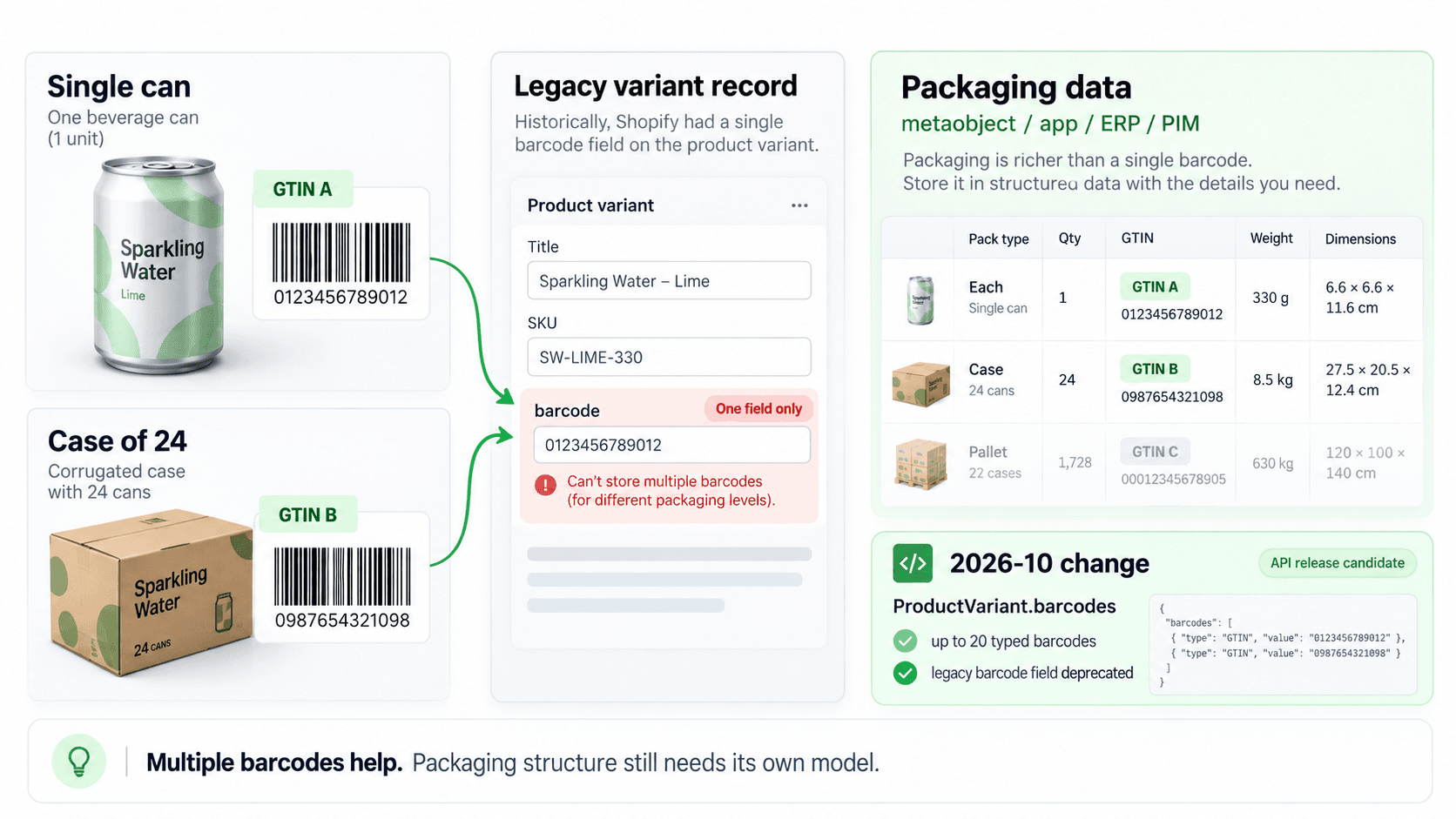
Three barcodes, one field
GS1's guidance is unambiguous: each packaging level needs its own GTIN. The number on a case of 24 cans has to differ from the number on a single can. The consumer unit gets a GTIN-13, captured in the EAN-13 barcode you see at a till. Cases and cartons get GTIN-14s derived from it, captured in ITF-14 — which is explicitly not for retail checkout, and which can be printed straight onto corrugated board rather than onto a label at all.
So one product in a warehouse can legitimately carry three identifiers, each meaning a different physical thing: one can, a sleeve of ten, a carton of a hundred and twenty.
Shopify's product record holds one. On the current stable API version a variant carries a single barcode string, and there is no native second or third field to put the others in. For most merchants that is exactly right, because most merchants sell consumer units and never touch a carton. For anyone placing purchase orders against a supplier, it means the data the packaging needs does not fit where the products live.
What the artwork actually needs
On the artwork generator we built for a wholesale supplier there are four sticker designs — product, inner, carton, and an additional format — and each draws from the appropriate item, inner-box or outer-carton EAN field. Four layouts, three identifiers, different dimensions, different content on each.
The quantity rule is the part that catches people. Sticker counts come from packaging data rather than the purchase-order quantity. A line for 240 units needs 240 item labels, 24 inner labels and two carton labels: one input, three different numbers, and none of them is the number written on the order. “Print the labels for this order” sounds like a single quantity. It never is.
type Level = "item" | "inner" | "carton";

type Packaging = {
  level: Level;
  /** The GTIN for this level. Null when the supplier has not supplied one. */
  gtin: string | null;
  /** How many consumer units this level contains. Always 1 for "item". */
  unitsPerPack: number;
};

type Label = {
  level: Level;
  gtin: string;
  symbology: "EAN-13" | "ITF-14";
  /** How many of this label to print. Derived, never taken from the order. */
  quantity: number;
};

type Refusal = { level: Level; reason: string };

/**
 * Works out which labels a purchase-order line needs.
 *
 * `orderedUnits` is in consumer units. Label counts are derived from the
 * packing hierarchy, so a line for 240 units produces 240 item labels, 24
 * inner labels and 2 carton labels — three different numbers from one input.
 */
export function labelsFor(
  packaging: readonly Packaging[],
  orderedUnits: number,
): { labels: Label[]; refusals: Refusal[] } {
  const labels: Label[] = [];
  const refusals: Refusal[] = [];

  if (!Number.isInteger(orderedUnits) || orderedUnits <= 0) {
    return {
      labels,
      refusals: [{ level: "item", reason: "ordered units must be a positive integer" }],
    };
  }

  for (const pack of packaging) {
    if (!Number.isInteger(pack.unitsPerPack) || pack.unitsPerPack <= 0) {
      refusals.push({
        level: pack.level,
        reason: "units per pack is missing or not a positive integer",
      });
      continue;
    }

    // No fallback. A carton printed with the item's GTIN scans at goods-in as
    // one consumer unit, and GS1 requires a distinct GTIN per level anyway.
    if (pack.gtin === null || pack.gtin.trim() === "") {
      refusals.push({ level: pack.level, reason: "no GTIN for this packaging level" });
      continue;
    }

    labels.push({
      level: pack.level,
      gtin: pack.gtin.trim(),
      symbology: pack.level === "item" ? "EAN-13" : "ITF-14",
      quantity: Math.ceil(orderedUnits / pack.unitsPerPack),
    });
  }

  return { labels, refusals };
}Where the packaging data lives
If Shopify cannot hold the inner and carton identifiers, something else has to. Metafields are the obvious answer and they do work, but they are a place to put values rather than a model — nothing in a metafield knows that the carton contains ten inners, and that relationship is exactly what the label counts depend on.
We put it in the supplier portal, which was already the operations layer this business was running on and already held the packing specification. The portal became the source of truth for packaging and the artwork generator reads from it. That decision has a cost and it is the usual one: two systems now hold product data, so the boundary between them has to be stated rather than assumed. Shopify owns what is sold. The portal owns how it is packed.
What 2026-10 changes, and what breaks quietly
This constraint is being lifted. From API version 2026-10 a variant accepts up to 20 barcodes, each up to 255 characters, and each can declare a type — UPC, EAN, ISBN, GTIN or ASIN. Untyped values are accepted and stored as they are. The packaging hierarchy can live on the variant after all.
The migration detail matters more than the feature. Reading the old singular barcode field returns the first entry in the new list. Writing it updates the first position and leaves the rest alone. A single variant input cannot set both barcode and barcodes. No removal date has been announced for the singular field.
Which means nothing breaks loudly. An integration reading the singular field keeps working, keeps returning a plausible value, and silently stops seeing the other nineteen — Shopify's own changelog names this as a risk of silent truncation. If a fulfilment or labelling integration reads it and somebody adds a carton GTIN in the admin, the integration will not error. It will carry on printing the item barcode onto cartons, and the first person to find out will be standing at goods-in.
A PDF is not a page request
The generator exports a complete purchase order as one document, and the first version did not survive contact with a real one. Generation logic was adjusted after testing large purchase orders that initially exceeded practical request duration — sixty-plus products, each with several image-heavy pages, assembled inside a single request.
This is the failure that works for the whole of development and then arrives in the first week of use, because development orders have four lines. A document build is a batch workload wearing a web request's clothing: the work grows with the order, the timeout does not, and the first thing to break is the largest and most important order rather than the smallest. It wants to be a job with a queue and a result to collect, not a button that blocks until it has finished.
The thumbnail is product data
One small decision turned out to matter more than its size suggests. Which Shopify product image becomes the packaging thumbnail is a choice, and it is not a presentation choice — the same image has to appear on the same product's artwork for the next purchase order, and the one after that. Left as a default it changes the moment somebody reorders the media on the product. Stored as a preference, it becomes part of the product's packaging record.
Artwork automation only works when the data underneath it is standardised, and that includes the parts that do not look like data.
When this needs an engineer
It does not need one if you sell consumer units at retail with one barcode per variant. Shopify's own Retail Barcode Labels app and the label printers around it do that job properly, and building something is the wrong call. The same holds if your purchase orders are small and the labels are a five-minute job — automation has to beat five minutes plus the cost of owning the thing that replaced them.
It needs engineering when the product has a packaging hierarchy, because that is the point where the label stops being derivable from the product record. Three identifiers, a pack structure that decides the quantities, a supplier submitting the data, and artwork that has to be correct before anything is manufactured — none of that is a setting. It is a data model with a document generator attached. It sits with the rest of our B2B and supplier operations work and the supplier portal that feeds it, and it is Shopify B2B engineering.
Send us the store and the symptom.