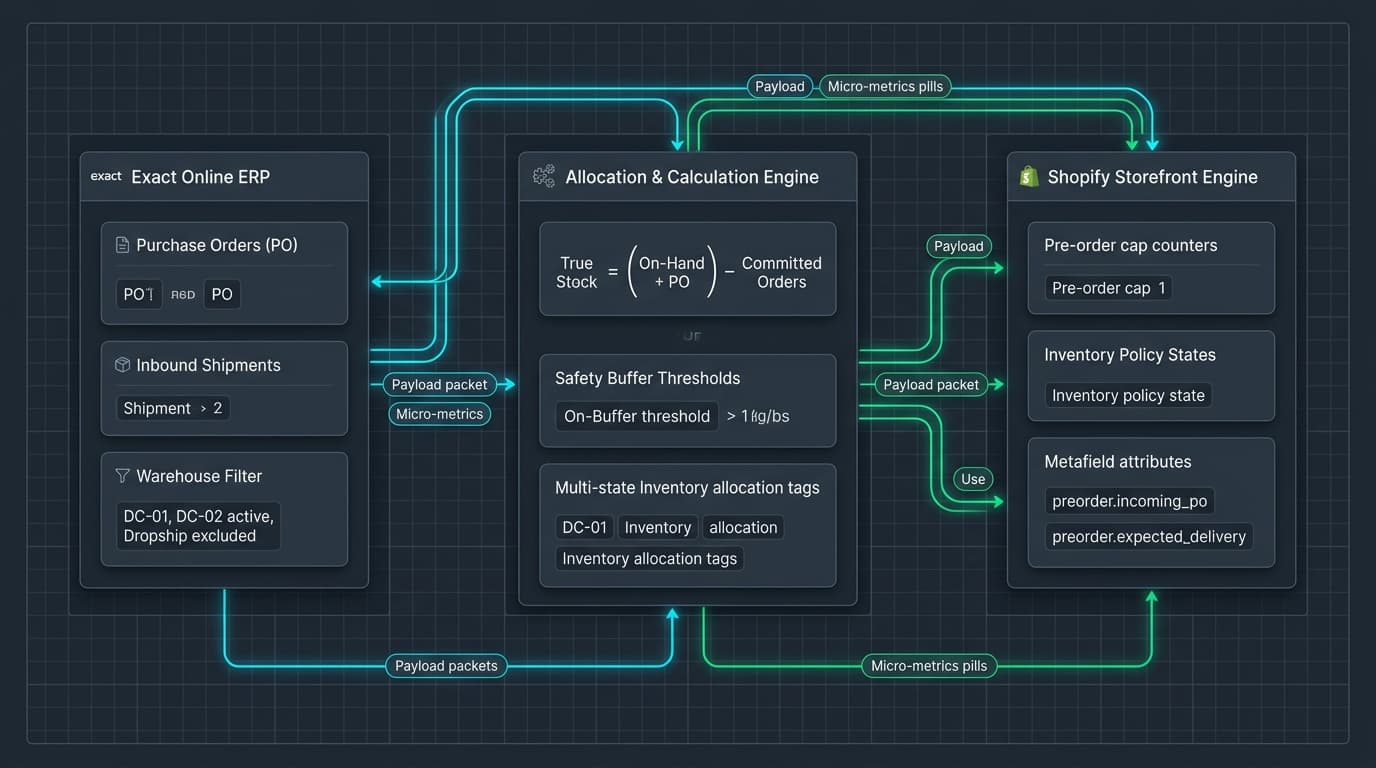
The duplicate maintenance cycle
Selling goods before they physically reach a warehouse is an effective way to maintain cash flow and revenue momentum. But in most multichannel businesses, pre-orders are treated as storefront merchandising rather than inventory operations.
The standard pattern relies on third-party Shopify apps. A merchant installs an app, flags products for pre-order, types in an arbitrary inventory limit, and sets an estimated arrival date. When the shipment arrives, staff must remember to open the app, disable pre-order mode, adjust quantities, and restore standard checkout behaviour.
This manual workflow creates duplicate labour and guarantees human error. The ERP system—in our work, typically Exact Online—already knows which purchase orders are approved, which suppliers have confirmed production, and when shipments are expected. Entering that same information by hand into a Shopify app is a maintenance liability that breaks under scale.
When we rebuilt the Exact Online pre-order automation for Weldaad, the objective was to eliminate this duplicate entry cycle. Pre-orders should not be maintained; they should be calculated directly from actual purchase order data.
Three inventory states, not one
In a basic Shopify store without an ERP, inventory is binary: in stock or out of stock. Shopify has an "allow backorders" checkbox (continue_selling_when_out_of_stock), but it is an unconstrained switch. Enabling it allows infinite sales, exposing the merchant to unbounded liability if a supplier short-ships.
In an ERP like Exact Online, inventory is an evolving state machine:
- Current physical stock (CurrentStock): Physical units sitting on warehouse shelves right now.
- Allocated stock (AllocatedStock): Physical units already committed to open wholesale sales orders or active picking waves.
- Expected inbound stock (PlanningIn): Units on approved purchase orders that have not yet arrived.
Warehouse filtering: not all stock is web stock
Available stock for immediate delivery is CurrentStock − AllocatedStock. If that number is positive, the product is in stock and should ship immediately. Pre-order logic must not trigger.
Only when physical available stock hits zero does pre-order calculation begin. At that point, the purchasable pool is determined by PlanningIn, minus any pre-orders customers have already placed against that inbound shipment.
The next failure mode is multi-warehouse inventory leakage. When a business operates both ecommerce and physical locations, stock is distributed across multiple facilities. Exact Online tracks inventory per warehouse code: central logistics, physical retail showrooms, outlet stores, and quarantine locations.
If your integration naively queries stock across the whole company, showroom samples will distort your calculations. A dining table displayed in an Amsterdam showroom exists in Exact's CurrentStock, but it cannot be packed and shipped to an online customer in Munich. If that showroom stock is included in the web calculation, the store will believe it has stock on hand, disabling pre-order mode and promising immediate delivery for an item bolted to a display plinth.
The same rule applies to inbound purchase orders. A purchase order consigned directly to an offline store must not inflate the ecommerce pre-order cap. The calculation must enforce an explicit allowlist of authorized fulfilment warehouses.
export interface StockPosition {
  sku: string;
  warehouse: string;
  currentStock: number;
  allocatedStock: number;
  planningIn: number; // expected incoming PO quantities
}

export interface PreorderPolicy {
  bufferRate: number; // e.g. 0.10 for 10% safety buffer
  fixedBuffer: number; // e.g. 2 units
}

export type StorefrontStatus =
  | "IN_STOCK"
  | "PREORDER_AVAILABLE"
  | "PREORDER_SOLD_OUT"
  | "OUT_OF_STOCK";

export interface PreorderDecision {
  sku: string;
  status: StorefrontStatus;
  availableNow: number;
  preorderCap: number;
  incomingTotal: number;
  committedPreorders: number;
}

/**
 * Calculates Shopify inventory and pre-order caps from Exact Online stock positions,
 * filtering by designated fulfillment warehouse and subtracting existing commitments.
 */
export function calculatePreorderAllocation(
  sku: string,
  positions: StockPosition[],
  committedPreorders: number,
  allowedWarehouses: Set<string>,
  policy: PreorderPolicy = { bufferRate: 0, fixedBuffer: 0 }
): PreorderDecision {
  // Aggregate stock positions across authorized warehouses only
  let warehouseCurrent = 0;
  let warehouseAllocated = 0;
  let warehousePlanningIn = 0;

  for (const pos of positions) {
    if (pos.sku === sku && allowedWarehouses.has(pos.warehouse)) {
      warehouseCurrent += Math.max(0, pos.currentStock);
      warehouseAllocated += Math.max(0, pos.allocatedStock);
      warehousePlanningIn += Math.max(0, pos.planningIn);
    }
  }

  // Real physical stock available on the warehouse shelf
  const availableNow = Math.max(0, warehouseCurrent - warehouseAllocated);

  if (availableNow > 0) {
    return {
      sku,
      status: "IN_STOCK",
      availableNow,
      preorderCap: 0,
      incomingTotal: warehousePlanningIn,
      committedPreorders,
    };
  }

  // Shelf stock is 0; check expected incoming stock on approved purchase orders
  if (warehousePlanningIn === 0) {
    return {
      sku,
      status: "OUT_OF_STOCK",
      availableNow: 0,
      preorderCap: 0,
      incomingTotal: 0,
      committedPreorders,
    };
  }

  // Pre-order pool is incoming stock minus orders already placed against that inbound PO
  const netIncoming = Math.max(0, warehousePlanningIn - committedPreorders);

  // Apply merchant safety buffers to prevent overselling on supplier shortages
  const buffered = Math.floor(netIncoming * (1 - policy.bufferRate)) - policy.fixedBuffer;
  const preorderCap = Math.max(0, buffered);

  return {
    sku,
    status: preorderCap > 0 ? "PREORDER_AVAILABLE" : "PREORDER_SOLD_OUT",
    availableNow: 0,
    preorderCap,
    incomingTotal: warehousePlanningIn,
    committedPreorders,
  };
}Calculating the pre-order cap
The calculation evaluates each SKU systematically. Physical shelf stock in the designated fulfilment centre always takes precedence. If shelf stock is exhausted, the engine calculates the net inbound pool and applies a safety buffer. If a supplier routinely short-ships, the policy shaves ten percent off the inbound quantity before publishing the pre-order cap to Shopify.
The pagination trap at 1,500 SKUs
Once the calculation logic is proven, the architecture must survive ERP API constraints. Exact Online’s REST API endpoints—such as Logistics/StockPositions and Inventory/ItemWarehouses—return a maximum of sixty records per request on standard CRUD queries, using $skiptoken for subsequent pages.
Across fifteen hundred SKUs, retrieving full stock positions requires twenty-five sequential API calls. If the synchronisation worker fails to follow pagination tokens, or if an uncaught network timeout aborts the loop on page two, the script will process the first sixty products and terminate.
The catastrophic bug is what happens next. If the worker treats unreturned SKUs as having zero stock, it will push zero inventory and disabled pre-order flags to the remaining fourteen hundred and forty products in Shopify. Overnight, ninety-six percent of the merchant’s catalogue is marked "Sold Out."
A robust ERP synchronization must implement dataset completeness verification. The worker must know its expected SKU manifest before updating Shopify. If the retrieved record count fails to match the manifest, the sync must abort and alert an engineer rather than writing partial, destructive updates to the live storefront.
Metafields over storefront injection
Where does the pre-order state live once calculated?
Commercial pre-order apps typically inject JavaScript tags into the storefront theme. When a customer lands on a product page, the client-side script fires, fetches state from the app vendor's external server, and uses DOM manipulation to swap the "Add to Cart" button with a "Pre-order" button.
This approach degrades performance. The customer sees the button flicker from "Sold Out" to "Pre-order" half a second after page load, and if the app's server experiences latency, the button never updates at all.
The architectural solution is native Shopify metafields. Our integration writes three fields directly to the product or variant record: custom.preorder_enabled (boolean), custom.preorder_cap (integer), and custom.expected_delivery_date (date/string).
Because these fields reside natively inside Shopify, the Liquid theme evaluates them server-side during the initial HTML render. The page arrives in the browser with the correct button text, availability badges, and delivery timeline already rendered. There is zero client-side layout shift, no external script tag, and no third-party server dependency in the checkout path.
What this does not handle
This system calculates availability based on documented ERP states; it cannot anticipate unrecorded real-world events. If a container ship is delayed by customs inspection, Exact’s PlanningIn date remains unchanged until a purchasing coordinator updates the purchase order line in the ERP. Code cannot know that a shipment is stuck at Rotterdam harbour unless a human records it.
It also assumes purchase order lines are not fungible across corporate entities. If a business operates multiple legal entities with separate tax registrations, transferring inventory between entities requires formal intercompany transactions in Exact that this calculation does not automate.
And it does not eliminate the need for customer communication. When pre-order items are delayed, notifying customers and managing partial fulfilment is an operational responsibility that sits in order management workflows, as explored in our write-up on wholesale order allocation.
When this needs an engineer
You do not need a custom pre-order integration if you sell standard manufactured goods with predictable three-day restocking cycles from domestic suppliers. In that case, checking Shopify's native "continue selling when out of stock" box and adding a simple theme notice is adequate.
You do need one when you operate a wholesale or made-to-order business with lead times of four to twelve weeks, where incoming stock is finite, expensive, and tracked inside an ERP. If overselling incoming stock means cancelling customer orders, and if manual spreadsheet updates are consuming hours of staff time each week, automating pre-orders from ERP data is essential.
That is the integration architecture we build across our ERP case studies, and it is what makes Shopify ERP integration an operational asset rather than just a data pipeline.
Send us the store and the symptom.