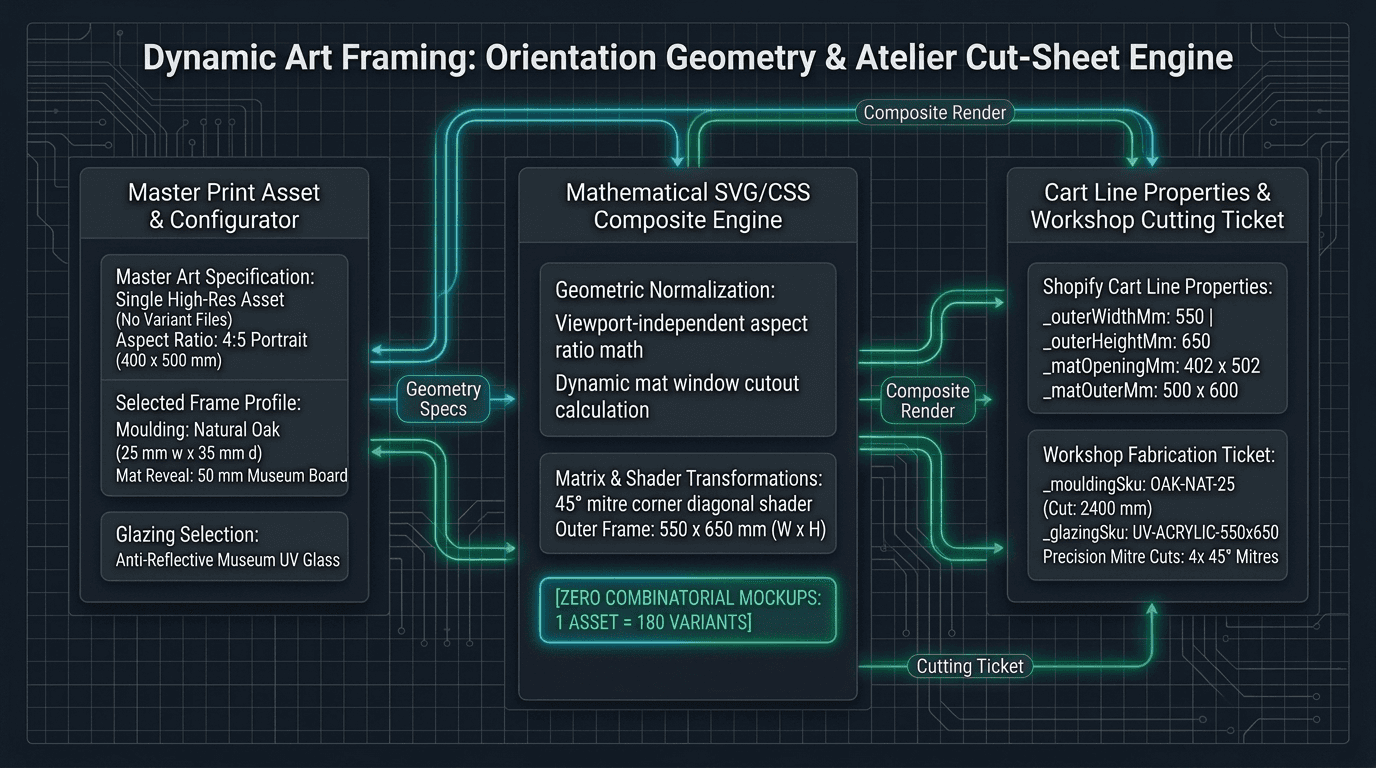
The combinatorial explosion of static framing mockups
Standard Shopify theme architectures assume that each variant maps cleanly to a discrete product image. For apparel, footwear, and consumer packaged goods, this 1:1 mapping works because colourways and finishes are finite. When a merchant sells customizable art, framing, and bespoke wall décor, that assumption collapses.
Consider the baseline configuration matrix for a fine art gallery like Citizen Atelier: 4 print sizes, 3 orientations, 3 mat options, 3 mat colours, 5 moulding profiles, and 3 glazing grades. Even if glazing grades do not require distinct images, the visual matrix for a single artwork is 4 sizes × 3 mat options × 3 mat colours × 5 moulding profiles = 180 visual combinations.
In our earlier analysis of configurator preview media limits, we highlighted that Shopify raised the product variant cap to 2,048 in late 2025 while explicitly leaving the media limit frozen at 250 assets per product. A single print with 180 visual combinations consumes nearly three-quarters of the entire product media allowance. A second print size or an additional timber profile breaches the platform ceiling completely.
Furthermore, pre-rendered mockups fail when an artist uploads an original piece with an idiosyncratic aspect ratio (such as a 1:2.35 panoramic canvas or a circular tondo). The gallery team must manually warp frame textures around the new ratio, export twenty variants, and manually assign media IDs in the Shopify Admin.
Why pre-rendered images break responsive visual hierarchy
Beyond file quantity, static framing mockups introduce severe visual fidelity flaws on mobile viewports.
When a 25-millimetre timber moulding is rendered onto an 800×1000-millimetre canvas and exported as a flat JPEG, the frame border occupies roughly 5% of the total image width. When the same customer switches to a smaller 300×400-millimetre print, the identical 25-millimetre moulding physically occupies 15% of the total width. In a pre-rendered composite displayed on a mobile screen (roughly 375 pixels wide), the physical scale collapses: the physical moulding looks disproportionately thin on large prints and disproportionately thick on small prints.
Worse, standard responsive image tags scale the entire bitmap proportionally. When a customer zooms into an artwork to inspect brushstrokes or paper grain, the pre-rendered mat and frame stretch and blur along with the artwork. The customer cannot inspect the bevelled 45-degree angle of the mat window opening or the grain of the solid oak rebate.
To convey authenticity and luxury in art ecommerce, the presentation layer must treat framing as a dynamic architectural assembly: the artwork master is an independent, zoomable bitmap layer; the mat board is a mathematical vector mask with real-world proportions and subtle drop shadows; and the moulding is a border-box texture layer whose visual stroke weight scales relative to physical room dimensions, not arbitrary screen pixels.
Orientation geometry: aspect ratio normalization and dynamic composition
The solution begins with mathematical geometry. Rather than storing pre-composed graphics, the storefront customiser ingests a single high-resolution master asset and computes framing layers dynamically.
In this architecture, the storefront renders the composition using SVG or layered CSS Flexbox/Grid: the outermost container enforces the exact aspect ratio of finishedOuterDimensionsMm; CSS border-image or SVG pattern elements tile high-resolution wood grain seamlessly along the 45-degree corner mitres without stretching; the mat board SVG polygon renders the interior cut-out with an inset shadow simulating the 1.5mm white core bevel; and the master artwork sits centered behind the mat opening, maintaining crisp pixel density at any zoom level.
export interface FrameMouldingSpecification {
  sku: string;
  name: string;
  material: "wood" | "metal" | "acrylic";
  faceWidthMm: number;
  rabbetDepthMm: number;
  pricePerMeter: number;
}

export interface MatSpecification {
  style: "none" | "single" | "double";
  revealMm: number;
  bottomWeightedExtraMm?: number;
  colorCode: string;
  colorName: string;
  pricePerSquareMeter: number;
}

export interface FramingOrderInput {
  artworkId: string;
  artworkTitle: string;
  printWidthMm: number;
  printHeightMm: number;
  printBasePrice: number;
  orientation?: "portrait" | "landscape" | "square";
  mat: MatSpecification;
  moulding: FrameMouldingSpecification;
  glazing: "standard_glass" | "uv_acrylic" | "museum_anti_reflective";
  glazingPricePerSquareMeter?: number;
  joiningLaborFee?: number;
  pricingStep?: number;
}

export function calculateFramingGeometryAndCutSheet(input: FramingOrderInput) {
  if (input.printWidthMm <= 0 || input.printHeightMm <= 0) {
    throw new Error("Print dimensions must be strictly positive integers in millimetres.");
  }

  // 1. Determine orientation from physical dimensions
  let detectedOrientation: "portrait" | "landscape" | "square" = "square";
  if (input.printWidthMm > input.printHeightMm) detectedOrientation = "landscape";
  else if (input.printWidthMm < input.printHeightMm) detectedOrientation = "portrait";

  if (input.orientation && input.orientation !== detectedOrientation) {
    throw new Error(
      `Orientation mismatch: specified '${input.orientation}' but dimensions ${input.printWidthMm}x${input.printHeightMm}mm are '${detectedOrientation}'.`,
    );
  }

  const aspectRatio = Math.round((input.printWidthMm / input.printHeightMm) * 1000) / 1000;

  // 2. Mat calculations with 2mm edge overlap (4mm total window reduction)
  const isMatted = input.mat.style !== "none" && input.mat.revealMm > 0;
  const reveal = isMatted ? input.mat.revealMm : 0;
  const bottomExtra = isMatted ? (input.mat.bottomWeightedExtraMm ?? 0) : 0;

  const matWindowOpeningMm = isMatted
    ? { width: input.printWidthMm - 4, height: input.printHeightMm - 4 }
    : { width: input.printWidthMm, height: input.printHeightMm };

  const matOuterDimensionsMm = isMatted
    ? {
        width: matWindowOpeningMm.width + 2 * reveal,
        height: matWindowOpeningMm.height + 2 * reveal + bottomExtra,
      }
    : { width: input.printWidthMm, height: input.printHeightMm };

  // 3. Glass dimensions match mat outer footprint
  const glassSizeMm = { width: matOuterDimensionsMm.width, height: matOuterDimensionsMm.height };

  // 4. Exterior frame footprint includes 2x moulding face width
  const finishedOuterDimensionsMm = {
    width: glassSizeMm.width + 2 * input.moulding.faceWidthMm,
    height: glassSizeMm.height + 2 * input.moulding.faceWidthMm,
  };

  // 5. Cost accounting and workshop cutting ticket
  const glassAreaM2 = (glassSizeMm.width / 1000) * (glassSizeMm.height / 1000);
  const perimeterM = (2 * (finishedOuterDimensionsMm.width + finishedOuterDimensionsMm.height)) / 1000;

  const printCost = input.printBasePrice;
  const matCost = isMatted ? Math.round(glassAreaM2 * input.mat.pricePerSquareMeter * 100) / 100 : 0;
  const mouldingCost = Math.round(perimeterM * input.moulding.pricePerMeter * 100) / 100;
  const glazingRate = input.glazingPricePerSquareMeter ?? 45.0;
  const glazingCost = Math.round(glassAreaM2 * glazingRate * 100) / 100;
  const laborCost = input.joiningLaborFee ?? 25.0;

  const rawTotal = printCost + matCost + mouldingCost + glazingCost + laborCost;
  const step = input.pricingStep ?? 0.05;
  const finalPrice = Math.round(rawTotal / step) * step;

  return {
    artworkId: input.artworkId,
    detectedOrientation,
    aspectRatio,
    matWindowOpeningMm,
    glassSizeMm,
    finishedOuterDimensionsMm,
    breakdown: { printCost, matCost, mouldingCost, glazingCost, laborCost, finalPrice },
    workshopLineProperties: {
      _artworkId: input.artworkId,
      _orientation: detectedOrientation,
      _printSizeMm: `${input.printWidthMm}x${input.printHeightMm}`,
      _matOpeningMm: `${matWindowOpeningMm.width}x${matWindowOpeningMm.height}`,
      _glassCutMm: `${glassSizeMm.width}x${glassSizeMm.height}`,
      _finishedOuterMm: `${finishedOuterDimensionsMm.width}x${finishedOuterDimensionsMm.height}`,
      _mouldingSku: input.moulding.sku,
      _glazingType: input.glazing,
    },
  };
}The atelier cut-sheet: mat reveals, glass dimensions, and moulding footprints
In bespoke art framing, customer-facing visualization is only half of the engineering challenge. The second half is manufacturing fulfillment.
When a customer orders a framed print, the framing workshop cannot build from a generic order title like 'Botanical Study - Framed Oak'. The atelier needs exact, millimeter-accurate cut sheets: the glass and backing cut size (which matches matOuterDimensionsMm), the computerised mat cutter (CMC) aperture (which cuts matWindowOpeningMm with its critical 2mm overlap), and the optical bottom-weighting adjustment.
In traditional gallery framing, positioning an artwork dead-center inside a mat creates an optical illusion where the art appears to sink downward. Adding a 10mm or 15mm bottom weight (bottomWeightedExtraMm) compensates for this physiological effect. The calculation engine pushes the bottom border lower while adjusting the overall glass height accordingly.
Finally, interior designers and art collectors must know the true outer wall footprint before purchasing to ensure the framed piece fits between architectural moldings or furniture. Adding twice the moulding face width gives the true exterior wall measurement.
Translating geometry into immutable line item properties
Because the calculated frame geometry is continuous and parameterized, it cannot map to pre-existing Shopify variants without exhausting options and variant limits. As established in our foundational guide on when variants are the wrong model, dimensional products must use a single base variant with the calculated price bound via Cart Transform and the manufacturing specification attached as line item properties.
When the customer clicks 'Add to Cart', the configurator emits the workshopLineProperties generated by calculateFramingGeometryAndCutSheet (_artworkId, _orientation, _printSizeMm, _matOpeningMm, _glassCutMm, _finishedOuterMm, _mouldingSku).
These properties travel from the browser through the cart into the Shopify Order document. In the fulfillment workshop, custom packing and cutting tickets automatically read _glassCutMm, _matOpeningMm, and _mouldingSku to feed directly into computerized saws and mat cutters without human calculation.
What browser-side framing geometry cannot do
While mathematical framing previews eliminate tens of thousands of static files, the architectural approach has distinct trade-offs:
No realistic reflection or ray-traced lighting: CSS and 2D canvas composites cannot simulate complex 3D ray-traced lighting reflections, refractive glass distortions, or depth of field in luxury room settings. For hero gallery mockups, 3D WebGL (Three.js) or pre-rendered lifestyle sets are still required.
Heavy client-side SVG rendering on low-powered devices: Rendering complex SVG filters across multiple gallery items on a collection page can degrade mobile scrolling performance. The dynamic preview must be restricted to the product detail page, while collection grids show flat master art tiles.
Client-side pricing must be verified server-side: Because the dimensions and moulding rates are assembled in the browser, a malicious actor could intercept the cart call and modify line item properties or prices. The resulting order must either pass through an HMAC-signed price authority worker or be verified via a Shopify Function before fulfillment.
When this needs an engineer
If you sell standard pre-framed art in three fixed frame sizes (A4, A3, A2) using two basic aluminium profiles, standard Shopify variants with pre-rendered mockups are adequate. The file count remains well within Shopify's 250-media limit.
You need an engineered dynamic framing architecture when you offer bespoke museum-grade framing where customers configure custom mat margins, bottom-weighting, and premium hardwood mouldings; when your catalogue features hundreds of original artworks across unpredictable aspect ratios where pre-rendering static mockups would exceed platform limits; when your framing atelier requires automated, millimeter-exact cutting tickets generated directly from customer orders without manual math; and when you require bespoke Shopify custom applications that preserve responsive visual hierarchy across both mobile phones and desktop displays, as demonstrated in our custom Shopify applications collection and custom Shopify app development services.
Send us the store and the symptom.