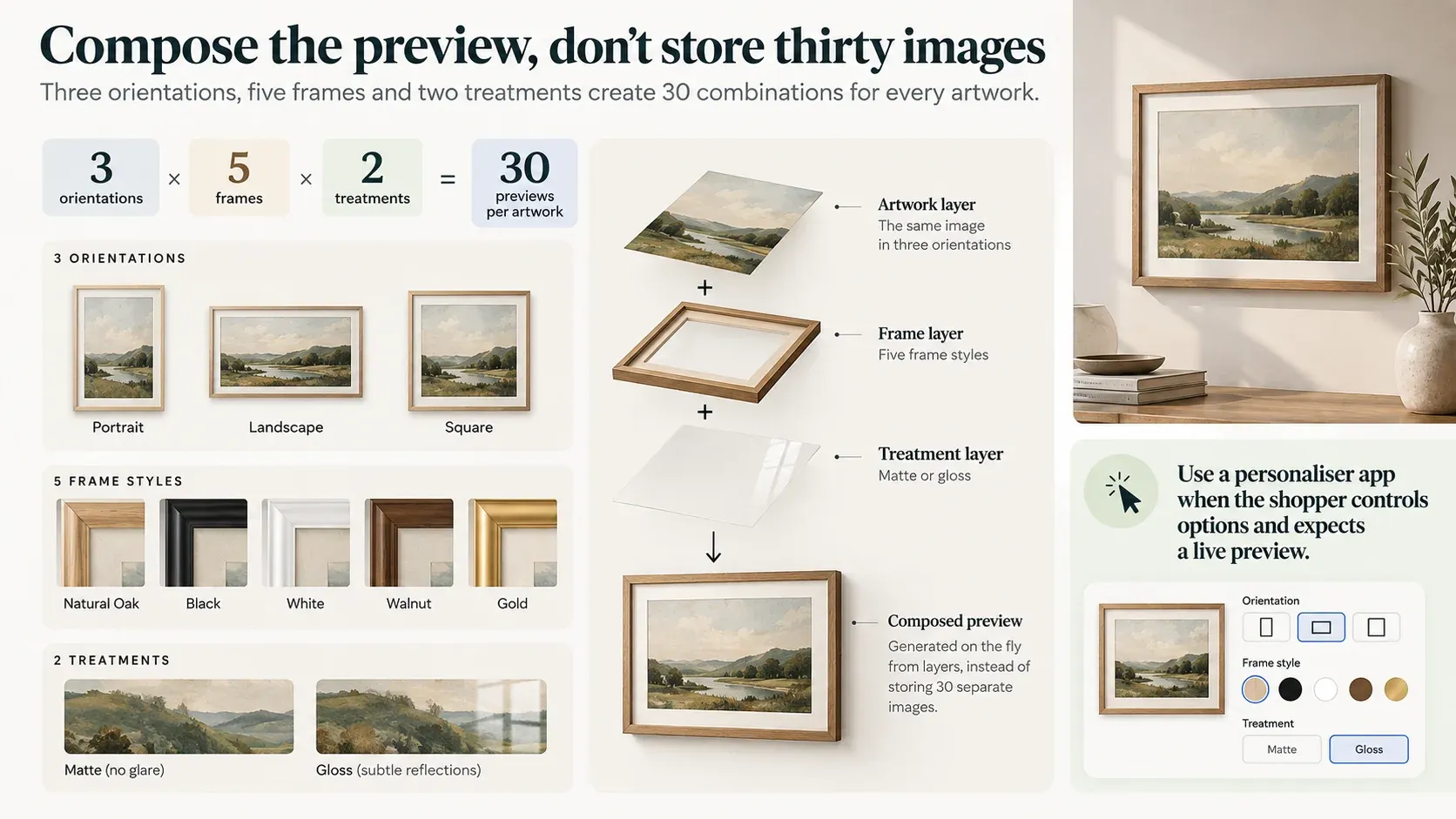
Count the space before you agree to photograph it
This is arithmetic anybody can do and almost nobody does at the point it would help, which is before the design is signed off.
Pre-rendering means every combination is a stored image, and combinations multiply. Composing means one asset per option value, layered at render time, and assets add. Three plus five plus two is ten. Three times five times two is thirty. At four axes of four it is sixteen against two hundred and fifty-six.
/** Shopify's per-product media limit. Not raised with the 2,048 variant increase. */
export const MEDIA_CAP = 250;

/**
 * Pre-rendered: every combination is its own stored image.
 * Composed: one asset per option value, layered at render time.
 */
export function previewCost(axes) {
  const names = Object.keys(axes);
  if (names.length === 0) throw new Error("at least one axis is required");

  let prerendered = 1;
  let composed = 0;

  for (const name of names) {
    const n = axes[name];
    if (!Number.isInteger(n) || n < 1) {
      throw new Error(`axis "${name}" must be a positive integer, got ${n}`);
    }
    prerendered *= n;
    composed += n;
  }

  return {
    prerendered,
    composed,
    // The cap applies per product. Exceeding it is not a performance concern,
    // it is the point at which the approach stops being possible at all.
    exceedsMediaCap: prerendered > MEDIA_CAP,
    ratio: Number((prerendered / composed).toFixed(2)),
  };
}The ceiling is 250, and it did not move
There is also a ceiling, and it is lower than people expect. A Shopify product can hold 250 media items, and that limit did not move when the variant ceiling went from 100 to 2,048 in October 2025 — Shopify confirmed in December that the media cap was excluded from the increase. So a product can carry two thousand variants and two hundred and fifty images. Whether the product should have variants at all is a question worth settling first; this is what happens to the pictures once it does.
Citizen Atelier's storefront composes: artwork is displayed within frame treatments rather than storing every visual combination as a separate static image, and the template adapts to portrait, landscape or square from metafields rather than from a branch in the theme. Two different product page layouts run on the same configuration logic underneath.
When the axis is the customer
Then there is the case where counting does not help, because one of the axes is not yours.
A customer uploading their own logo has no option count. There is no finite set to pre-render, no shoot that could cover it, and no number to put in a spreadsheet. Composition is not the cheaper approach here; it is the only approach, and recognising that early changes what gets designed.
Shopify supports the mechanics natively — a line item property with a file input carries an uploaded file through to the order, and stagedUploadsCreate handles larger media. So getting the file in is not the hard part.
The hard part is that the preview and the production file are two different artefacts with two different jobs. The preview has to be immediate and convincing at the moment of decision. The production file has to be correct at print resolution, positioned to a real tolerance, in a colour space somebody downstream can work with. A logo that looks right in a browser at 400 pixels wide is not yet a print-ready asset, and treating the preview as if it were is the mistake that surfaces at the other end of the process, in production, where it is expensive.
The app question, answered honestly
There is a well-developed market here and it deserves a straight answer. Customily, Customix, Teeinblue, Zepto, Live Product Options and others all do live preview, uploaded images and print-ready file generation, with print-on-demand integrations attached. For a print-on-demand business, one of them is almost certainly the right answer and a custom build would be a poor use of money.
BE O Lifestyle tested several. The objections recorded were specific rather than ideological: the apps imposed layout restrictions, some functionality was missing, and the capabilities that were wanted sat behind additional subscription tiers. What tipped it was the layout — the client wanted a branded page, and the app wanted to own the page.
That is the honest boundary. An app is right when your product is a canvas the app already understands and your page can accommodate its interface. It stops being right when the customisation is the page rather than a widget on it, when the option model is specific enough that you are fighting the app's, or when what you actually need is three fields and a preview and you are paying a monthly tier for a configurator you use a tenth of.
What would change my mind on any given project: if the requirement is genuinely print-on-demand with a standard product catalogue, the app wins on cost and on the fulfilment integrations you would otherwise build yourself.
Not every configurator ends in a cart
The other assumption worth examining is that a configurator finishes with add-to-cart.
BE O's does not. A business customer chooses a product and a colour, uploads a logo, sees it on the product, and submits the configuration as a structured enquiry for quotation routed to the business team. There is no price at the end because the price depends on quantity, placement and print method, and a number generated before anyone has looked at the artwork would be a number somebody has to retract.
That flow sits alongside the ordinary consumer experience rather than inside it, which is the part most personaliser apps are not shaped for: they assume the configuration ends in a transaction. When the output is a qualified lead with the customer's own artwork attached, the thing being built is closer to a quoting tool than a product page.
The maintainability decision is worth naming too. New products are enabled through settings rather than a code change, which sounds like an implementation detail and is the difference between a tool the client owns and one they have to commission again next year.
What this does not do
It does not make composition free. Layered previews need assets produced to consistent dimensions and registration, and the frame is four pixels off on square artworks is a real afternoon. You have traded a production problem for a precision problem.
It does not solve print fidelity. Everything above is about what the customer sees. What the printer receives is a separate pipeline with its own resolution, bleed and colour requirements, and no amount of preview quality validates it.
And it does not remove the need for a decision about where options live. Metafields, product options and application state are all plausible homes for a configuration, and choosing wrongly is recoverable but tedious.
When this needs an engineer
Frequently it does not. If the combinations are few enough to photograph and stable enough to stay photographed, photograph them — pre-rendered images are simpler, faster and need no logic. If the product is print-on-demand with a conventional catalogue, use one of the apps. If the configurator would be used twice a month, a form and an email is a proportionate answer.
It becomes engineering when multiplying the axes produces a number nobody will fund, when one of the axes belongs to the customer so there is no number at all, or when the configuration has to end somewhere other than a cart. That was the case for an art retailer composing frame previews rather than producing them, and for a drinkware brand whose branded customiser replaced the personalisation apps it had tested; both sit with our other product configurators. It is Shopify product configurator work rather than theme work, because the thing being designed is a space rather than a page.
Send us the store and the symptom.