The 72 DPI screen trap: why canvas screenshots destroy print quality
The fundamental disconnect in web-to-print ecommerce is the distinction between CSS logical pixels and physical print dots. Displays render between 72 and 220 DPI, whereas fine art giclée printers, sublimation presses, and laser engraving machines require 300 to 600 DPI of uncompressed raster data or pure mathematical vector bezier paths.
When personalization apps capture user configurations using canvas.toDataURL(), they introduce resolution degradation, lossy compression artifacts along typography, and catastrophic sRGB-to-CMYK color muddiness. The browser canvas is merely an interactive viewport, not the production asset.
- Resolution Degradation: 600×800 CSS pixels stretched across a 16×20-inch frame drops to a pixelated 37.5 DPI.
- Lossy Artifacts: In-browser JPEG compression introduces 8×8 block noise that ruins laser engraving lines.
- Color Shifts: Browsers lack ICC color profile mapping, shifting vibrant sRGB hues into muddy CMYK prints.
Client-side pre-flight: validating DPI against physical dimensions
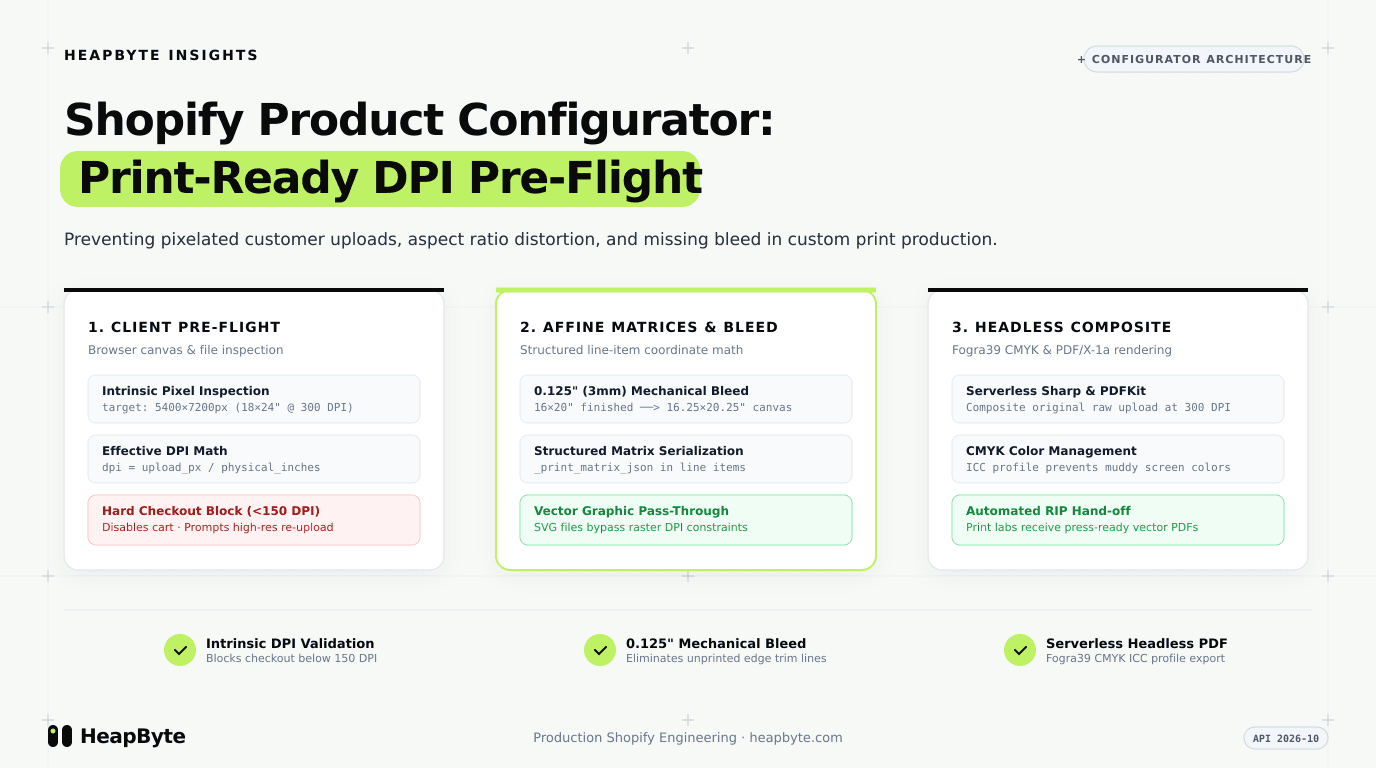
To stop unprintable orders before money changes hands, your configurator must run automated pre-flight checks inside the client browser as soon as the user selects a file.
The pre-flight engine calculates effective resolution using the physical dimensions of the selected variant. If the effective resolution is below 150 DPI, the Add to Cart button is blocked with explicit pixel requirements, while SVG vectors scale infinitely and pass automatically.
Affine transformation matrices and 0.125-inch bleed margins
When a customer moves, rotates, or zooms their uploaded artwork inside the preview, the configurator must communicate those adjustments to the print facility without re-encoding lossy images.
By storing an affine transformation matrix (scale factor, rotation angle, and pan offsets) alongside a mandatory 0.125-inch (3mm) perimeter bleed allowance in hidden line-item properties, the backend rendering engine has everything needed to reproduce the customer's design at full press resolution.
import assert from "node:assert/strict";

export interface PhysicalPrintSpec {
  widthInches: number;
  heightInches: number;
  bleedInches: number; // typically 0.125 inches (3mm)
  targetDpi: number; // typically 300 DPI for high-end giclée or laser engraving
}

export interface CustomerUploadInput {
  intrinsicWidthPx: number;
  intrinsicHeightPx: number;
  mimeType: "image/png" | "image/jpeg" | "image/tiff" | "image/svg+xml";
  fileSizeBytes: number;
  userTransform?: {
    scale: number; // 1.0 = 100%
    rotationDegrees: number; // 0, 90, 180, 270
    panOffsetX: number; // CSS canvas pixels
    panOffsetY: number; // CSS canvas pixels
  };
}

export interface PrintPreflightResult {
  isPrintReady: boolean;
  effectiveDpi: number;
  requiredWidthPx: number;
  requiredHeightPx: number;
  bleedWidthPx: number;
  bleedHeightPx: number;
  aspectRatioMismatchPercent: number;
  errors: string[];
  warnings: string[];
  productionPayload?: {
    normalizedMatrix: {
      scaleFactor: number;
      rotation: number;
      cropBox: { x: number; y: number; width: number; height: number };
      bleedBox: { x: number; y: number; width: number; height: number };
    };
    lineItemProperties: Record<string, string>;
  };
}

const MINIMUM_PERMISSIBLE_DPI = 150; // Warn between 150 and 299; block below 150
const MAX_ASPECT_RATIO_TOLERANCE_PERCENT = 5.0; // Above 5% distortion requires letterboxing or user crop clamp

export function validateAndGeneratePrintArtifact(
  spec: PhysicalPrintSpec,
  upload: CustomerUploadInput
): PrintPreflightResult {
  const errors: string[] = [];
  const warnings: string[] = [];

  const totalPhysicalWidthInches = spec.widthInches + spec.bleedInches * 2;
  const totalPhysicalHeightInches = spec.heightInches + spec.bleedInches * 2;

  const requiredWidthPx = Math.round(spec.widthInches * spec.targetDpi);
  const requiredHeightPx = Math.round(spec.heightInches * spec.targetDpi);

  const bleedWidthPx = Math.round(totalPhysicalWidthInches * spec.targetDpi);
  const bleedHeightPx = Math.round(totalPhysicalHeightInches * spec.targetDpi);

  const isVector = upload.mimeType === "image/svg+xml";

  const transformScale = upload.userTransform?.scale ?? 1.0;
  const effectiveWidthPx = isVector ? requiredWidthPx : upload.intrinsicWidthPx * transformScale;
  const effectiveHeightPx = isVector ? requiredHeightPx : upload.intrinsicHeightPx * transformScale;

  const effectiveDpiX = isVector ? spec.targetDpi : effectiveWidthPx / spec.widthInches;
  const effectiveDpiY = isVector ? spec.targetDpi : effectiveHeightPx / spec.heightInches;
  const effectiveDpi = Math.round(Math.min(effectiveDpiX, effectiveDpiY));

  if (!isVector) {
    if (effectiveDpi < MINIMUM_PERMISSIBLE_DPI) {
      errors.push(
        `Resolution too low: file produces ${effectiveDpi} DPI for a ${spec.widthInches}"×${spec.heightInches}" print. Minimum required is ${MINIMUM_PERMISSIBLE_DPI} DPI (target: ${spec.targetDpi} DPI). Upload at least ${requiredWidthPx}×${requiredHeightPx}px.`
      );
    } else if (effectiveDpi < spec.targetDpi) {
      warnings.push(
        `Resolution sub-optimal: file provides ${effectiveDpi} DPI. Target commercial standard is ${spec.targetDpi} DPI. Minor pixelation may be visible on high-contrast edges.`
      );
    }
  }

  const targetAspect = spec.widthInches / spec.heightInches;
  const sourceAspect = upload.intrinsicWidthPx / upload.intrinsicHeightPx;
  const aspectDeviation = Math.abs((sourceAspect - targetAspect) / targetAspect) * 100;

  if (aspectDeviation > MAX_ASPECT_RATIO_TOLERANCE_PERCENT && !isVector) {
    warnings.push(
      `Aspect ratio mismatch: uploaded artwork is ${sourceAspect.toFixed(3)}, while print target is ${targetAspect.toFixed(3)} (${aspectDeviation.toFixed(1)}% variance). Image must be cropped or padded to avoid stretching.`
    );
  }

  const MAX_FILE_SIZE = 100 * 1024 * 1024;
  if (upload.fileSizeBytes > MAX_FILE_SIZE) {
    errors.push(`File size ${(upload.fileSizeBytes / (1024 * 1024)).toFixed(1)}MB exceeds maximum 100MB threshold.`);
  }

  const isPrintReady = errors.length === 0;

  if (!isPrintReady) {
    return {
      isPrintReady: false,
      effectiveDpi,
      requiredWidthPx,
      requiredHeightPx,
      bleedWidthPx,
      bleedHeightPx,
      aspectRatioMismatchPercent: Number(aspectDeviation.toFixed(2)),
      errors,
      warnings,
    };
  }

  const bleedPaddingXPx = Math.round(spec.bleedInches * spec.targetDpi);
  const bleedPaddingYPx = Math.round(spec.bleedInches * spec.targetDpi);

  const normalizedMatrix = {
    scaleFactor: Number(transformScale.toFixed(4)),
    rotation: upload.userTransform?.rotationDegrees ?? 0,
    cropBox: {
      x: bleedPaddingXPx,
      y: bleedPaddingYPx,
      width: requiredWidthPx,
      height: requiredHeightPx,
    },
    bleedBox: {
      x: 0,
      y: 0,
      width: bleedWidthPx,
      height: bleedHeightPx,
    },
  };

  const lineItemProperties: Record<string, string> = {
    _print_dimensions: `${spec.widthInches}x${spec.heightInches}in`,
    _print_target_dpi: String(spec.targetDpi),
    _print_effective_dpi: String(effectiveDpi),
    _print_bleed_inches: String(spec.bleedInches),
    _print_matrix_json: JSON.stringify(normalizedMatrix),
    _print_preflight_passed: "true",
  };

  return {
    isPrintReady: true,
    effectiveDpi,
    requiredWidthPx,
    requiredHeightPx,
    bleedWidthPx,
    bleedHeightPx,
    aspectRatioMismatchPercent: Number(aspectDeviation.toFixed(2)),
    errors,
    warnings,
    productionPayload: {
      normalizedMatrix,
      lineItemProperties,
    },
  };
}Serverless headless compositing: CMYK Fogra39 and PDFKit export
Once an order is created in Shopify, the backend fulfillment service executes the second half of the pipeline. An orders/paid webhook fetches the uncompressed master asset from merchant storage and passes it to a serverless Sharp/libvips worker.
The worker applies the exact affine transformation matrix, performs ICC color transformation from sRGB to ISO Coated v2 (ECI) / Fogra39 CMYK, and compiles the final print artifact into a PDF/X-1a container with automated trim and bleed crop marks.
Platform boundaries: Shopify CDN limits and cart line property storage
Never encode base64 image strings into cart properties; store only clean JSON matrices and CDN asset URLs. Customer artwork should be uploaded directly to merchant-owned Cloudflare R2 or AWS S3 buckets using short-lived pre-signed URLs.
Using the underscore prefix convention for line-item properties (_print_matrix_json, _print_effective_dpi) ensures Shopify hides the raw technical data from customer-facing emails while keeping it accessible through Admin GraphQL APIs.
When this needs an engineer
You do not need a custom build for basic text-monogrammed coffee mugs where simple theme inputs suffice. You need an engineer when your products require gallery-grade physical precision: archival fine art prints, laser-engraved drinkware, and millimetre-accurate picture frames that demand automated pre-flight resolution guards.
Review our work in product configurator design, explore the Citizen Atelier framing configurator case study and BE-O Lifestyle personalization case study, or inspect our Shopify product configurator development services.