Totals are contracts, not arithmetic
On standard ecommerce storefronts, modifying prices in the browser is dangerous, but in legacy checkout.liquid it was common practice to inject fees, core deposits, and delivery surcharges using custom script tags or DOM manipulation. Shopify designed Checkout Extensibility specifically to eliminate arbitrary DOM execution and unverified price calculations.
Within a Checkout UI Extension, your code runs inside a sandboxed Web Worker. As we explored when measuring the checkout UI extension budget, the extension environment has no direct access to the document object model, cannot alter Shopify's native pricing calculations, and cannot append synthetic summary rows to the order review component. The order subtotal, tax liability, and grand total are calculated server-side by Shopify's core checkout engine.
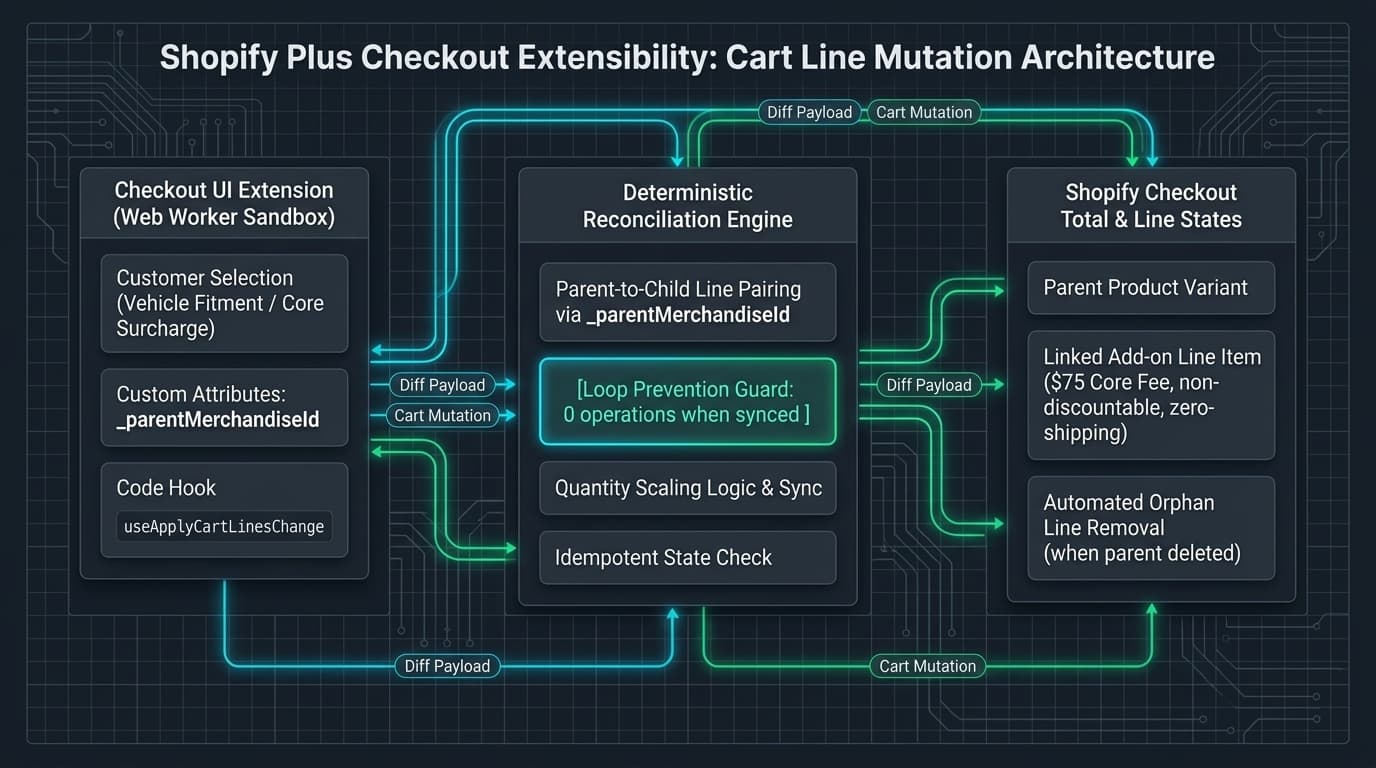
If your business model requires custom calculations—whether that is an oversized vehicle fitment fee, a refundable core recycling charge, a mandatory warranty fee, or hazardous material handling—there are only two supported ways to get that money onto the invoice: increase the unit price of the base product using a Cart Transform Function, or inject a distinct, dedicated product variant into the checkout lines array using the useApplyCartLinesChange hook.
When the calculation depends on combinations across multiple cart items, or when accounting requires the fee to appear as an explicit line item on the invoice with its own tax code, injecting a dedicated variant is the only viable path. And that is where the operational traps begin.
The zero-price variant versus line item mutation
Teams approaching custom checkout fees usually test one of two patterns. The first pattern is the zero-dollar placeholder product: the store catalogue contains a hidden "Custom Surcharge" product priced at €0.00. The checkout extension writes an attribute to the cart, and a server-side Cart Transform Function uses LineUpdateOperation to reprice that line to the calculated fee amount.
This pattern sounds elegant in documentation, but it introduces a major dependency: Cart Transform Functions require custom app deployment and strict execution boundaries. More importantly, Cart Transform cannot create a product out of thin air; the zero-dollar placeholder product must already be present in the cart before the function executes.
The second, more direct pattern utilizes the Checkout UI Extension mutation hook: useApplyCartLinesChange. When the extension renders inside checkout targets such as purchase.checkout.cart-line-item.render-after or purchase.checkout.block.render, it evaluates the active cart lines, calculates required surcharges based on business rules, and issues an addCartLine mutation containing the fee variant's merchandiseId.
This pattern works reliably on Shopify Plus, but it immediately encounters the fundamental disconnect of checkout extensibility: the parent item and the child fee have no native platform relationship.
The orphaned child line trap
Shopify's checkout engine understands variants, quantities, and line item keys. It does not understand that line item 4 exists solely because line item 1 is in the cart.
When a customer expands the order summary on mobile or looks at the right sidebar on desktop, every cart line has a native removal icon or quantity selector. If the customer removes the parent heavy-duty bumper, Shopify deletes that line item and recalculates the order total. Crucially, the checkout engine does not inform your extension that a parent was removed, nor does it cascade the deletion to related lines.
If your extension only checks whether to add the fee when the checkout first loads, the child fee becomes an orphaned line. The customer is left looking at an unexplained €120 surcharge for a product they just removed. If they complete the order, they pay for a fee they did not incur, triggering an inevitable customer support ticket and a manual refund.
To make custom checkout calculations resilient, child fee lines must carry explicit, non-destructive metadata in their line attributes. Specifically, the child line must store the merchandiseId of the parent item that justified its creation. With that link stamped into the line attributes, a reconciliation function can inspect the cart and recognize when a child fee no longer has a living parent.
The reactive re-render loop
Once developers realize they must clean up orphaned fees, the standard reaction is to write a reactive useEffect hook that watches cart lines and dispatches applyCartLinesChange whenever a fee condition is unmet.
This code is an architectural trap. When the checkout loads, the hook fires and dispatches a mutation. Shopify's checkout engine receives the change, updates lines, recalculates taxes, and emits a new cart state. Because the cart lines array changed, useCartLines emits a fresh reference, firing the useEffect hook a second time.
If the comparison logic is even slightly imprecise—or if the mutation takes 150 milliseconds to settle—the hook sees an unresolved condition and fires another mutation. The browser enters an infinite mutation loop. Within two seconds, Shopify throttles the session with rate-limiting errors, the checkout buttons freeze, and the buyer cannot complete their purchase.
Preventing this requires strict idempotency. The reconciliation logic must be pure: given the current array of cart lines and active business rules, it must return an empty list of operations whenever the cart is already in its target state.
export interface CartLineAttribute {
  key: string;
  value: string;
}

export interface CheckoutCartLine {
  id: string;
  merchandiseId: string;
  quantity: number;
  attributes: CartLineAttribute[];
}

export interface RequiredAddonRule {
  parentMerchandiseId: string;
  addonMerchandiseId: string;
  addonTitle: string;
  ratioPerParent: number;
}

export type CartLineOperation =
  | { type: "addCartLine"; merchandiseId: string; quantity: number; attributes: CartLineAttribute[] }
  | { type: "updateCartLine"; id: string; quantity: number }
  | { type: "removeCartLine"; id: string };

/**
 * Reconciles checkout cart lines against business rules, generating atomic mutation
 * operations while strictly preventing recursive re-render loops and orphaned child charges.
 */
export function reconcileCheckoutAddonLines(
  cartLines: CheckoutCartLine[],
  rules: RequiredAddonRule[]
): CartLineOperation[] {
  const operations: CartLineOperation[] = [];

  for (const rule of rules) {
    let requiredQty = 0;
    for (const line of cartLines) {
      if (line.merchandiseId === rule.parentMerchandiseId) {
        requiredQty += line.quantity * rule.ratioPerParent;
      }
    }

    const existingAddonLines = cartLines.filter(
      (line) =>
        line.merchandiseId === rule.addonMerchandiseId &&
        line.attributes.some(
          (attr) =>
            attr.key === "_parentMerchandiseId" &&
            attr.value === rule.parentMerchandiseId
        )
    );

    if (requiredQty === 0) {
      // Clean up orphaned add-on lines when parent product has been removed
      for (const addonLine of existingAddonLines) {
        operations.push({ type: "removeCartLine", id: addonLine.id });
      }
    } else if (existingAddonLines.length === 0) {
      // Add missing fee line with parent tracking metadata
      operations.push({
        type: "addCartLine",
        merchandiseId: rule.addonMerchandiseId,
        quantity: requiredQty,
        attributes: [
          { key: "_parentMerchandiseId", value: rule.parentMerchandiseId },
          { key: "_addonRule", value: rule.addonTitle },
        ],
      });
    } else if (existingAddonLines.length === 1) {
      // Exactly one add-on line exists: update only if quantity is mismatched
      const singleLine = existingAddonLines[0];
      if (singleLine.quantity !== requiredQty) {
        operations.push({ type: "updateCartLine", id: singleLine.id, quantity: requiredQty });
      }
      // Idempotency guarantee: if quantity matches, operations remains empty, breaking the re-render loop
    } else {
      // Consolidate duplicate lines created during concurrent checkout network updates
      const [primary, ...duplicates] = existingAddonLines;
      if (primary.quantity !== requiredQty) {
        operations.push({ type: "updateCartLine", id: primary.id, quantity: requiredQty });
      }
      for (const dup of duplicates) {
        operations.push({ type: "removeCartLine", id: dup.id });
      }
    }
  }

  return operations;
}Discounts and tax leaks on fee lines
Once the line mutation logic is idempotent and orphans are cleaned up, the next failure mode is financial: discount and taxation bleeding.
When you add a product variant to represent an environmental surcharge, vehicle fitment fee, or deposit, Shopify treats it as a standard commercial line item. If the merchant runs a storewide promotion—such as "Take 20% off your entire order"—Shopify's discount engine automatically applies that 20% deduction to your fee variant. A mandatory €100 government battery recycling deposit suddenly becomes an €80 deposit, leaving the merchant to fund the remaining €20 out of their operating margin.
Preventing discount bleeding requires three configuration rules in the Shopify admin and product catalogue: mark fee variants as non-discountable so they are excluded from discount functions; set requiresShipping to false so carrier engines do not quote extra shipping fees for an intangible surcharge; and verify tax categorization to ensure freight surcharges and deposits inherit their legal VAT rates.
What this architecture does not handle
This approach solves line item synchronization within the standard checkout steps, but it has defined boundaries.
Accelerated checkout buttons (Shop Pay, Apple Pay, Google Pay, PayPal) that sit on the product page or cart drawer bypass the information step of checkout entirely. If your extension is anchored exclusively to the information step, a buyer checking out via Shop Pay can bypass the fee evaluation unless complementary server-side validation functions are active.
For mission-critical legal compliance or mandatory fees, client-side UI extensions should be paired with server-side checkout validation functions that refuse order completion if required fee lines are missing.
Finally, Checkout UI Extensions run inside checkout; they do not render in theme cart drawers. If you want the fee to be visible before checkout begins, the storefront cart template must run complementary synchronization logic.
When this needs an engineer
If you only need to charge flat handling fees across all orders, you do not need custom Checkout Extensibility code. Shopify's native shipping profiles, custom shipping rates, or standard product bundles can handle simple use cases without custom software.
It needs dedicated engineering when fees are conditional, variable, and tied to strict business logic: when fees scale proportionally with specific multi-line cart combinations, when charges must be dynamically updated or pruned as buyers adjust quantities inside checkout without causing infinite mutation loops, or when regulatory compliance mandates that deposits and fees remain separated on invoices.
In our work on bespoke Shopify Plus checkout builds and custom application architectures, we treat checkout not as a place for visual widgets, but as a high-stakes transaction pipeline where every mutation must be idempotent and provable.
Send us the store and the symptom.